Bullhorn Pricing: The Real Year-One Cost
Bullhorn Starter costs $99 and Core $165 per user. Use this year-one worksheet to compare plans, custom tiers, and optional products.



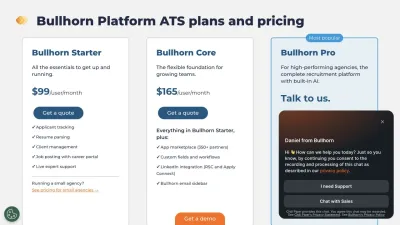
Bullhorn lists two public seat prices for small agencies. Starter costs $99 per user each month. Core costs $165 per user each month. Pro and Max need a custom quote. We checked these prices on August 29, 2026.
The public rates make a useful starting point. They do not give every buyer one final total. Your plan, team size, and optional products can change the bill. This guide gives you a simple year-one worksheet for an eight-person agency desk.
What Bullhorn publishes for small agencies in 2026
Bullhorn now gives clear list prices for its first two plans. Its official pricing page and small-agency pricing page also show what each plan includes.
The key point is simple. Pro includes several features that older guides call add-ons. Max then builds on Pro. The plan table below uses Bullhorn’s current US small-agency offer.
Source: Bullhorn’s small-agency pricing page, checked August 29, 2026.
Starter and Core let you work out a seat total. Pro and Max do not. You need a quote to learn the price of either plan.
Which Bullhorn features are included, optional, or separate
Three groups matter when you build a fair budget. First are features inside a plan. Pro includes AI search and match, process automation, and real-time analytics. Max includes all Pro features. It then adds Bullhorn’s agentic workflows.
Second are optional products. Bullhorn says Onboarding and Middle Office are optional and priced separately. Its main pricing page also lists products such as Messaging with a custom quote. Ask whether a product is part of your chosen plan or a separate line.
Third are stand-alone offers. Bullhorn One is its front-to-back suite. It includes everything in Front Office Enterprise, plus timesheet management, time interpretation, invoicing and billing, and pay and bill automation. Bullhorn lists it with custom pricing. It is not a small extra added to every plan.
This split prevents double counting. Do not price AI search, process automation, or real-time analytics again after choosing Pro. Do add any optional product shown as a separate line in your quote. Our recruiting software pricing comparison gives you another public baseline for agency software.
What can change your Bullhorn quote
Team size drives the Starter and Core totals. The chosen plan then sets the features in your base package. Moving to Pro or Max changes the price from public to custom.
Optional products can add more lines. For example, an agency may need Onboarding or Middle Office for temp work. A direct-hire desk may not need either. Bullhorn also gives Core users access to an app marketplace with more than 350 partners.
Marketplace access is included from Core. That does not tell you what each partner charges. Do not assume each tool is free or paid. List the partners you need, then ask who bills for each one.
This method works for other custom offers too. Our guide to Greenhouse ATS pricing uses the same rule: compare the work you need, not plan names alone.
What free Bullhorn implementation covers
Bullhorn says there are no setup fees on its small-agency offer. It lists free implementation for Starter, Core, and Pro. Max implementation is scoped in its custom quote.
That statement is useful, but a buyer still needs a clear scope. Ask which setup tasks are part of the service. Check training, field setup, data work, and integrations. If you are moving from another system, ask what your team must prepare.
These are questions, not extra costs we can assume. Bullhorn does not publish one standard data-work fee on the pages cited above. Put every answer in the order form before you compare totals. Our guide to moving from a legacy staffing suite can help you map the work.
Which Bullhorn terms can affect year two
Public plan pages do not show every contract term. They do not give one renewal rule for every buyer. They also do not explain every case where a user joins or leaves during a term.
Ask for the billing period and contract length. Ask when you can add or remove users. Check the notice date for renewal. Then ask how the next term’s price is set.
These checks do not mean a given fee will apply. They turn unknown terms into written facts. That makes your year-one and year-two budgets easier to compare.
Bullhorn year-one cost for an eight-person desk
Take a direct-hire agency with eight users. Starter and Core use public monthly rates. The math below covers twelve months and assumes the same eight seats all year.
The Starter floor is $9,504 for the year. The Core floor is $15,840. Both figures come straight from the public seat rate. They do not include tax or any separately priced product.
There is no sound public range for an eight-user Pro or Max setup. The same is true if you add Onboarding or Middle Office. Keep those cells marked “quote needed” until Bullhorn gives you a written price.
This worksheet is useful because it keeps facts and unknowns apart. It also stops an included Pro feature from being counted twice as an add-on.
How to fill in your own Bullhorn worksheet
Start with the people who need a seat. Count staff who will log in and use the tool. Do not use your full head count by default. A finance lead may need a seat, but a part-time adviser may not. Ask Bullhorn which roles need paid access.
Next, choose the plan that fits the work you do now. Starter has the core ATS tools. Core adds custom fields, linked apps, and more ways to shape your work. Pro adds the CRM, AI search and match, process rules, and live reports. Max adds agent-led tasks and outreach. Mark one plan as your base.
Now list the work that your base plan does not cover. A temp desk may need staff forms, time sheets, or bills. A perm desk may not. Put each need on its own row. Add Onboarding or Middle Office only if the work calls for it.
Then map each app in your old stack. Write down what it does and who pays for it. Some apps may stay in use. Some may be cut. Some may be replaced by the Bullhorn plan. This step helps you avoid paying twice for the same job.
Keep tax in its own row. Bullhorn says its list prices do not include VAT. Your tax will depend on where you buy and how the deal is set up. Use the tax shown on the quote, not a rough guess from this guide.
Use one row for setup. Write “included” only when the quote says what that word covers. If your team must clean old data or build fields, add the time that work may take. Keep staff time apart from cash paid to Bullhorn. Both affect the launch, but they are not the same type of cost.
Last, add a blank row for each term you still need. Do not fill gaps with a web estimate. Send the sheet to the sales rep and ask for a price or clear note in each cell. A blank cell is easy to spot. A guessed cost can look like a fact and lead to a poor choice.
Once all rows have an answer, add the first-year cash cost. Then make a second view for year two. This can show which rates are fixed and which terms may change. You now have a sheet that your team can check, share, and use in the next call.
Keep the sheet short and plain. Give each cost one row. Add a link to the quote next to each sum. Mark each tax, fee, and term in clear words. If a line is not in the quote, leave it blank. This makes the gaps easy to find before you sign.
Questions that make a Bullhorn quote easier to compare
Ask Bullhorn to show each part of the offer. A short list will give you a cleaner budget than one large total.
- Plan: Starter, Core, Pro, or Max.
- Users: the number of paid seats and the rule for changing that number.
- Included features: especially AI search and match, process automation, analytics, and outreach.
- Optional products: Onboarding, Middle Office, or any other separate item you need.
- Marketplace tools: which partner products are needed and who bills for them.
- Implementation: the setup, training, data, and integration work included.
- Support: the level and named contact included with the plan.
- Contract: billing period, term, renewal date, and the rule for future price changes.
Put the answers beside your desk’s real needs. Our guide to candidate and client CRM roles can help you cut features that do not fit your daily work.
How Leonar’s published seat price changes the worksheet
Leonar Professional costs $199 per user per month, $169 with a 12-month commitment billed monthly, or $149 with annual prepayment. It includes AI Copilot, sourcing and matching, multichannel sequences, a centralized inbox, contact enrichment credits, and API and MCP access. Tailored AI workflow implementation and support are quoted separately, from five users. Current Leonar pricing.
Those numbers are the seat subscription, not the whole bill. Professional includes AI sourcing. Reveals and AI actions draw on consumable credits. Optional credit packs and other add-ons can change the amount you pay.
| Budget item | Bullhorn | Leonar |
|---|---|---|
| Published seat price | Professional $99 and Core $165 per user; Pro and Max custom | Professional $199 per user; AI programme on quote |
| AI search or sourcing | Included in Pro and Max, which use custom plan prices | Included in Professional; reveals and AI actions use credits |
| Automation and outreach | Process automation in Pro; agentic outreach in Max; Messaging also has custom pricing | Multichannel sequences in Professional |
| Staffing operations | Optional Onboarding and Middle Office; Bullhorn One is a separate custom offer | Not a middle-office product |
| Published subscription price before a call | Professional and Core seats only | Professional software; tailored AI implementation and support on quote, from 5 users |
Professional is the software subscription; tailored AI audits, development, deployment and support have a separate scope and quote, from five users. Current Leonar pricing.
Is Bullhorn worth the price for your agency?
Bullhorn gives staffing firms a broad path from ATS work to front-to-back operations. Pro already includes AI search, process automation, and real-time analytics. Max adds a deeper agentic layer. Firms that need those tools may value the custom plan.
A smaller desk may only need Starter or Core. In that case, the public math is easy to check. The best choice depends on the work you run now, not the longest feature list.
Read what staffing teams say about Bullhorn for the wider product view. Then compare alternatives to Bullhorn for an agency desk with the same seat, feature, and contract worksheet.
Frequently asked questions about Bullhorn pricing
How much does Bullhorn cost per user in 2026? Bullhorn lists Starter at $99 per user per month and Core at $165 per user per month. These prices were checked on August 29, 2026. Pro and Max use custom quotes. Pro includes AI search and match, process automation, and real-time analytics. Max includes everything in Pro plus agentic workflows.
Does Bullhorn charge setup or implementation fees? Bullhorn says its Starter, Core, and Pro small-agency plans have no setup fees and include free implementation. Max implementation is part of its custom quote. Ask Bullhorn to state the exact setup, training, data, and integration work covered by your quote.
What Bullhorn costs are not public? Bullhorn does not publish prices for Pro or Max. It also gives custom quotes for optional products such as Onboarding and Middle Office. Bullhorn One is a separate front-to-back offer with custom pricing. Your known floor is the seat total for Starter or Core. The rest depends on the plan and products in your quote.
Can you negotiate Bullhorn pricing? Bullhorn does not publish a negotiation policy. Starter and Core have public list prices, while Pro, Max, and some optional products need a quote. Ask for each item, billing term, implementation scope, support level, and renewal rule in writing. That gives you a clear offer to review.
What is a transparent alternative to Bullhorn? Professional is the software subscription; tailored AI audits, development, deployment and support have a separate scope and quote, from five users. Current Leonar pricing.
Frequently asked questions
How much does Bullhorn cost per user in 2026?
Bullhorn lists Starter at $99 per user per month and Core at $165 per user per month. These prices were checked on August 29, 2026. Pro and Max use custom quotes. Pro includes AI search and match, process automation, and real-time analytics. Max includes everything in Pro plus agentic workflows.
Does Bullhorn charge setup or implementation fees?
Bullhorn says its Starter, Core, and Pro small-agency plans have no setup fees and include free implementation. Max implementation is part of its custom quote. Ask Bullhorn to state the exact setup, training, data, and integration work covered by your quote.
What Bullhorn costs are not public?
Bullhorn does not publish prices for Pro or Max. It also gives custom quotes for optional products such as Onboarding and Middle Office. Bullhorn One is a separate front-to-back offer with custom pricing. Your known floor is the seat total for Starter or Core. The rest depends on the plan and products in your quote.
Can you negotiate Bullhorn pricing?
Bullhorn does not publish a negotiation policy. Starter and Core have public list prices, while Pro, Max, and some optional products need a quote. Ask for each item, billing term, implementation scope, support level, and renewal rule in writing. That gives you a clear offer to review.
What is a transparent alternative to Bullhorn?
Leonar Professional costs $199 per user per month, $169 with a 12-month commitment billed monthly, or $149 with annual prepayment. It includes AI Copilot, sourcing and matching, multichannel sequences, a centralized inbox, contact enrichment credits, and API and MCP access. Tailored AI workflow implementation and support are quoted separately, from five users.
Answer 3 quick questions and we will recommend the best option for your hiring workflow.
How large is your recruiting team?

Author
André FarahCo-founder
André Farah is co-founder of Leonar, where he leads product strategy for the recruiting platform. With over 8 years of experience in HR technology and recruitment process optimization, he specializes in designing sourcing workflows, outbound sequences, and candidate engagement systems. André works closely with staffing agencies and in-house talent teams to build repeatable hiring processes that scale. He regularly shares insights on Boolean search techniques, multi-channel outreach, and the operational side of modern recruiting.