How to export candidates from Linkedin Recruiter?
Tips on how to extract candidates from a Linkedin Recruiter Search or Project, with Linkedin Recruiter Pro and Lite

LinkedIn’s Recruiter platform continues to evolve in 2026, but one frustration has stayed the same: getting your candidate data out of it is still harder than it should be. Whether you use Recruiter Lite or Pro, the built-in export options remain limited. The good news is that third-party tools have gotten significantly better at bridging this gap. In this updated guide, we cover every method available today.
Linkedin Recruiter is the tool used by many recruiters to find candidates. It this blog post, we will show you the options you have to export candidates from Linkedin Recruiter.
You will learn :
- How to export candidates from Linkedin Recruiter project.
- How to export candidates from a Linkedin Recruiter Search.
- How to enrich the data you get from importing candidates from Linkedin Recruiter search.
How to export profiles in Recruiter as a PDF, CSV or Excel file ?
One of the pain point is that Linkedin Recruiter does not have an easy option to export candidates. This article will show you what you can do in Linkedin Recruiter, and also the scrapping tools you can use to export profiles and avoid Linkedin’s limitations. Once your data is exported, a dedicated candidate sourcing software can help you organize and enrich those profiles efficiently.
What you can do in Linkedin Recruiter:
- You can export profile form the search results page to a PDF file, but you can only select up to 25 profiles.
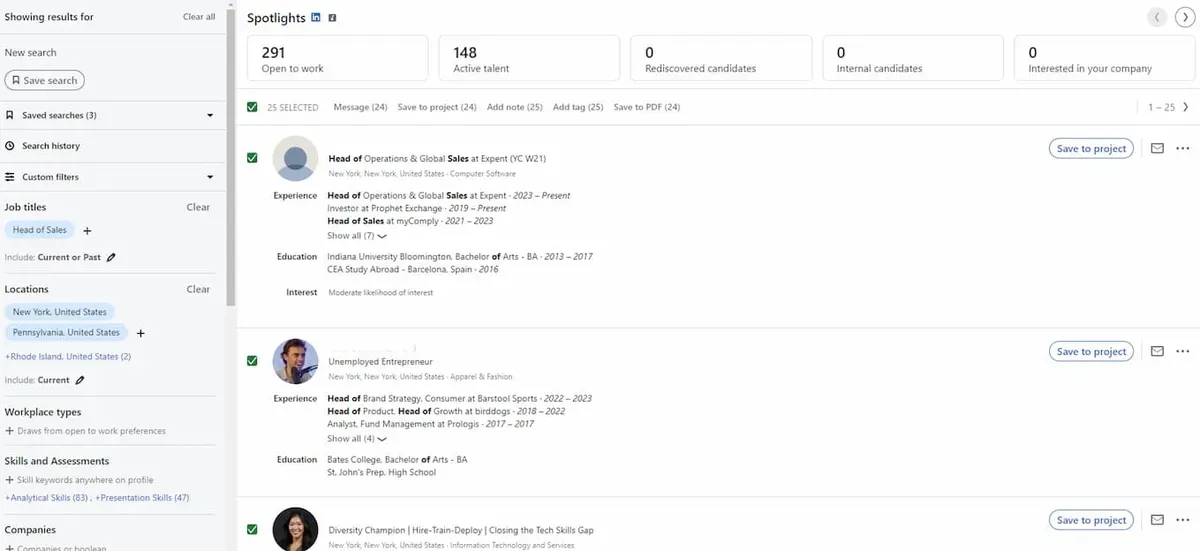
- You can export a profile from the Talent Pool or Pipeline tab in a project, to a PDF or CSV fle, but you are also limited to 25 profiles per export.
- You can export manually a PDF from a candidate’s profile.
The data you will get in the CSV file, for each candidate:
- First Name.
- Last Name.
- Headline.
- Location.
- Current job title.
- Current Company.
- Email Address & Phone number (if you are connected to this candidate).
- Profile URL.
One thing that you have to know is that there are some limits regarding the number of profiles you can download in Recruiter per month. You can download:
- 200 profils per month, per seat, via PDF.
- 5000 unique profils and 200 files per month, per seat, via CSV.
Relying on Linkedin Recruiter’s features to export candidates to an Excel file or to import candidates to a CRM or ATS is not enough and you will probably need to use a scraper that will help you export profiles from a Linkedin Recruiter Search or a Linkedin Recruiter Project.
How to export profiles from a Linkedin Recruiter Search using a scrapping tool like Leonar ?
In Recruiter, the only thing you can do with a Linkedin Recruiter Search is to import the 25 candidates displayed in a page. Using Leonar, you will be able to export the whole search :
- To your Leonar sourcing backoffice.
- To a recruitment campaign.
- To a talent pool.
Here are the steps you need to follow to export profiles from a Linkedin Recruiter Search:
Step 1: Log in to your Linkedin Recruiter Lite or Pro account
Step 2: Go to the Linkedin Recruiter Search you want to export or create a new search
Step 3: Click on the Leonar chrome extension to launch the scraper
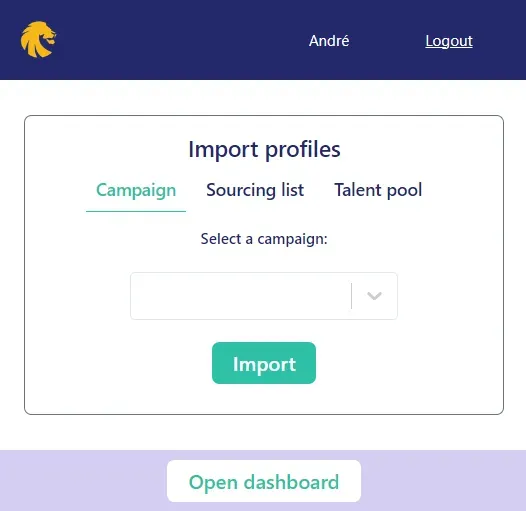
You can select where you want to export the candidates. You can choose to import the candidates:
- To a recruitment campaign or a sourcing list.
- To a Talent Pool.
After clicking on the import button, the scraper will start exporting automatically the candidates’ profiles
Something that you need to know is that Linkedin Recruiter Lite or pro will only display a maximum of 1000 profiles results. Even if the number of profiles for a search is above 1000, you will not be able to export with one search all the potential candidates. You will need to divide your search and split in two or more different searches, that gather less than 1000 candidates.
How to export profiles from a Linkedin Recruiter Project using a scrapping tool like Leonar ?
As you have also the same limit to export candidates from a Linkedin Recruiter Project, you can use Leonar’s scrapping feature to export as many candidates you want from a Linkedin Recruiter Project. For a technical deep dive on scraping methods, read our post on how to scrape LinkedIn Recruiter profiles at scale.
The steps you need to follow are pretty much the same.
Step 1: Log in to your Linkedin Recruiter Lite or Pro account
Step 2: Select the project
Step 3: Click on Talent Pool if you want to export candidates from the Talent Pool page, or Pipeline if you want to export candidates from the pipeline
Step 4: Click on the Leonar Google chrome extension to launch the scraper
You can select where you want to export the candidates. You can choose to import the candidates:
- To a recruitment campaign or a sourcing list.
- To a Talent Pool.
After clicking on the import button, the scraper will start exporting automatically the candidates’ profiles and data
👉 If you are interested in knowing more about scrapping, check our blog post on how to scrape Linkedin Recruiter
How to export candidates from Leonar to a CSV or Excel file?
You can export all the candidates you have in recruitment campaigns
There are no limits in terms of number of profiles or number of files.
Step 1: Log in to your Leonar’s account
**Step 2: Go to Leonar’s dashboard: **
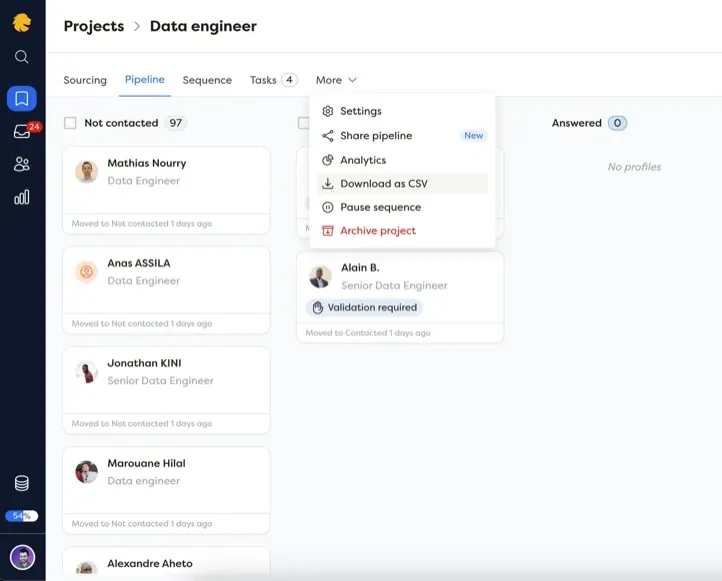
Step 3: Go to the Campaigns section and select the recruitment campaign you want
Step 4: On the top right of the screen, select “More Options” and click on “Download profiles as CSV”
What changed for LinkedIn Recruiter exports in 2025 and 2026
LinkedIn rolled out several updates to Recruiter between late 2025 and early 2026 that affect how you export data. The most notable change is the new “Recruiter Advanced” tier, which replaced Recruiter Corporate for many enterprise accounts. Export limits remain similar (25 profiles per batch in-app, 5,000 unique profiles per month via CSV), but the interface has been redesigned. The new project view groups candidates by pipeline stage, making it slightly easier to select specific cohorts for export.
LinkedIn also tightened its API restrictions in Q1 2026. Several older Chrome extensions that relied on unofficial API endpoints stopped working. Tools that use LinkedIn’s official partner integrations, or that operate through the browser like Leonar’s Chrome extension, remain fully functional. If you are evaluating a scraping tool, make sure it has been updated for 2026 compatibility.
On the pricing side, Recruiter Lite now costs $170 per month (up from $140 in 2024), while Recruiter Advanced sits at roughly $835 per month per seat. For teams exporting large volumes regularly, the cost of Recruiter alone often justifies investing in a dedicated sourcing tool that handles export, enrichment, and outreach in one place.
How to export candidates from Linkedin Recruiter to your Applicant Tracking System (ATS)
If you are using Leonar, you can import candidates from LinkedIn Recruiter to Leonar and then push them to almost every ATS. Check all the integration offered on this link: Integrations with Leonar
If you are using an ATS that is not available in the list below, feel free to reach out to us to see what we can do 😊
If you are not using Leonar, there is a feature in Linkedin Recruiter called Recruiter System Connect (RSC). However, only few ATS can be integrated with Recruiter. Check these two links below to see how candidates can be exported to your ATS through Linkedin Recruiter’s feature:
-
Export candidates to your Applicant Tracking System (ATS) with RSC: Export candidates to your ATS with RSC
-
ATS integration in Recruiter: ATS integration in LinkedIn Recruiter
Answer 3 quick questions and we will recommend the best option for your hiring workflow.
How large is your recruiting team?

Author
André FarahCo-founder
André Farah is co-founder of Leonar, where he leads product strategy for the recruiting platform. With over 8 years of experience in HR technology and recruitment process optimization, he specializes in designing sourcing workflows, outbound sequences, and candidate engagement systems. André works closely with staffing agencies and in-house talent teams to build repeatable hiring processes that scale. He regularly shares insights on Boolean search techniques, multi-channel outreach, and the operational side of modern recruiting.
Related articles
-
 LinkedIn Recruiter
Best LinkedIn Scraping Tools for Recruiters in 2026 (Tested)
-
 LinkedIn Recruiter
How to Use LinkedIn Recruiter: 2026 Guide
-
 LinkedIn Recruiter
LinkedIn Boolean Search for Recruiters (2026)