How to manage LinkedIn connection requests as a recruiter
Learn how recruiters organize LinkedIn connection requests with Leonar: one list, drafted notes, timed email follow-ups, every LinkedIn step sent by you.


Did you know that managing LinkedIn connection requests well can make a real difference to your sourcing results? Whether you are a recruiter, a sales professional or a founder, LinkedIn is where a lot of first contacts happen. The hard part is not clicking Connect. It is keeping track of who you invited, what you wrote, and what comes next. That is why many recruiters organize their LinkedIn outreach inside multichannel sequences, where the email steps run on their own and the LinkedIn steps stay in their hands. So how do you set that up without losing the personal touch?
What are LinkedIn connection requests?
LinkedIn connection requests are invitations you send to other members, asking them to join your professional network. When you send one, you start a potential relationship that could lead to a hire, a collaboration or a useful insight. They are a core feature of LinkedIn, and they let you reach people directly.
For recruiters, connection requests are also a way to grow a network on purpose. You are not just adding contacts. You are building a pool of people you can talk to again for the next role.
Why should you use LinkedIn connection requests?
Why prioritize connection requests in your outreach?
- Higher engagement rate: Connection requests see a noticeably higher response rate than InMails (around 56% versus 14% in the figures most recruiters quote), which makes them a strong way to start a conversation.
- No credit needed: Unlike InMails, which come in fixed monthly amounts on paid plans, connection requests do not use credits.
- Network growth: Every accepted request stays in your network, so you can message that person again for a future role.
👉 Check out our blog post: LinkedIn InMails vs. Connection Requests.
Understanding the limits of LinkedIn connection requests
Connection requests are a powerful tool, but they come with a few constraints.
First, the note you can attach is short. LinkedIn caps it at 200 characters on every account, so each word has to earn its place. Writing a clear, specific invitation in that space takes thought.
Second, LinkedIn limits the number of connection requests you can send each week, and the exact figure can vary by account. The purpose is to encourage thoughtful networking rather than broad outreach. You need to choose who you want to connect with each week.
Third, each request is sent by you, from your own account. There is no bulk send in LinkedIn, and that is by design. What you can organize is everything around the click: the list, the note, the timing and the follow-up.
Here is a tip: Choose connections based on your immediate needs and your long-term goals. Target people who align closely with the roles you fill, whether they are candidates, hiring managers or peers. You will get more value from each request if you focus on relevant people.
The guide to organizing LinkedIn connection requests as a recruiter
Looking to keep your LinkedIn networking consistent without turning it into generic spam? A good workflow helps you manage everything from finding the right profiles to following up by email, while every connection request is still sent by you. LinkedIn steps are tasks you complete yourself on LinkedIn.
Here is how that works in Leonar, step by step.
TL;DR
- Step 1: Build the candidate list in your workspace.
- Step 2: Define the messaging sequence.
- Step 3: Launch the sequence and work through the LinkedIn tasks.
- Step 4: Manage the campaign performance.
Build the candidate list in your workspace
The first step is to gather the right profiles. Here is how to build that list in Leonar:
- Create a candidate record with the Chrome extension.
When you are on a profile you want to keep, the extension creates a candidate record from the details you confirm, in the campaign of your choice. One profile at a time, reviewed by you.
- Import candidates from your ATS.
If you use an Applicant Tracking System, you can bring past applicants into your campaign. This is useful when you want to re-engage people you already know.
- Import candidates from a CSV file.
Got a list of contacts? Upload it as a CSV file to add these candidates to the campaign.
- Search Leonar’s own database.
Leonar ships a licensed candidate database with AI ranking, so you can build a shortlist without leaving the tool.
The sourcing interface uses a matching algorithm to make this faster. You describe the role and the criteria, and the tool ranks the candidates that fit best.
With these methods, you can set up a campaign that works. Remember: you cannot have good connections unless you have good candidates.
Define the messaging sequence you want to send
Next, define the sequence around your connection requests. Wondering how to make each request count? It is all about the message and the follow-up.
In Leonar, a sequence mixes two kinds of steps. Email, WhatsApp and SMS steps run on their own, with timing set in days. LinkedIn steps, such as the connection request and the first message after acceptance, are tasks: the tool prepares the draft and reminds you on the right day, and you send it from your own account. You can add a note to the request, or send it without a note if brevity suits your strategy better. Find inspiration and ready-to-use templates here.
Why is this important? Planning follow-ups and using several channels is the best way to lift your response rate. Candidates who ignore a LinkedIn invitation often answer an email a few days later. With this multichannel approach and timely follow-ups, you make a lasting impression that leads to more accepted requests and more conversations.
👉 For more information, check our multichannel outreach feature.
Here is a tip: When you write your note, think about what you and your new connection might offer one another. Is there an industry insight, a role, or a shared contact? Mentioning it makes the request more compelling.
Making connection request notes more personal with AI
Want to get more out of your connection requests? AI can help you draft each note. In Leonar, the AI features draft a note based on a prompt, your specific criteria and the candidate record. You read the draft, adjust it if needed, and keep it in the task for that candidate.
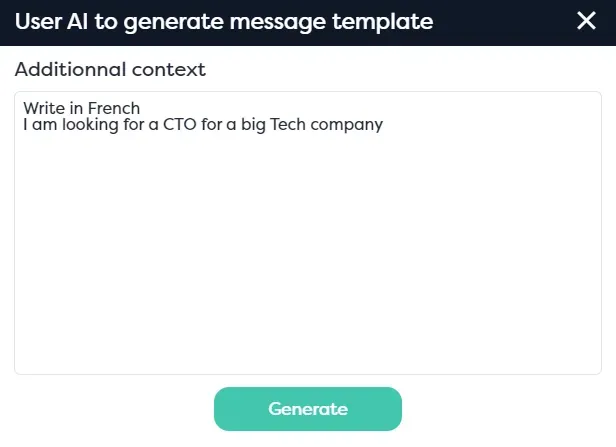
Why is this important? Your request is more likely to be accepted when the note is specific. Based on the data recruiters share, customized connection requests get accepted about 30% more often than generic ones. A good first impression lays the groundwork for a real professional relationship.
To learn more about how AI can craft personal messages for recruiting, check out our guide on using ChatGPT for recruiting.
You are not just reaching out on LinkedIn. You are connecting with purpose, and every interaction counts toward building your network.
Launch the sequence and work through the LinkedIn tasks
Once you have defined your messaging sequence, launch it from the web interface.

From that moment, the email steps run on their cadence. The LinkedIn steps appear as tasks on the day they are due, each with the candidate and the drafted note. You open the profile on LinkedIn, review the note, and send the request yourself, from your own account and within the limits that account allows. Then you mark the task as done.
The browser extension helps here, but it does not act in your place. It shows you the task and the draft next to the profile you are looking at, so you do not switch tabs to find them. What you save is the admin around each request, not the decision to send it.
Why work this way? Preparing outreach in one place keeps your messages consistent and your follow-ups on schedule, and every action stays attributable to the recruiter who chose to take it.
Quick tip: Keep an eye on your response and acceptance rates and adjust your campaigns regularly. Your networking strategy will be more effective if you refine your approach.
Manage campaign performance
Next, monitor the performance of your connection request sequence. To understand how well your outreach works, track a few key indicators: acceptance rate, reply rate on each channel, and the number of conversations that turned into a call.
Email replies are counted by the sequence. For LinkedIn steps, you log the outcome when you mark the task as done, and that feeds the same reports.
Why are these metrics important? You make better decisions when you look at the numbers. If the acceptance rate is not what you expected, refine the note or target a different audience. If the reply rate is high, your message resonates, so similar approaches are worth repeating.
Here is a tip: Set a specific goal for each campaign, such as a target acceptance rate or a number of calls booked. Then review the numbers every week.
Maximize recruitment results with multichannel outreach
Double your interview rates with effective multichannel outreach
Did you know that a multichannel approach can double your interview rates? A strong outreach workflow combines LinkedIn tasks, email and WhatsApp in one plan. Follow-ups that feel personal, and responses from top-tier candidates: that is what effective multichannel outreach looks like.
👉 Working with InMails as well? Read our guide on how to organize a LinkedIn InMail workflow.
Centralized communication for enhanced efficiency
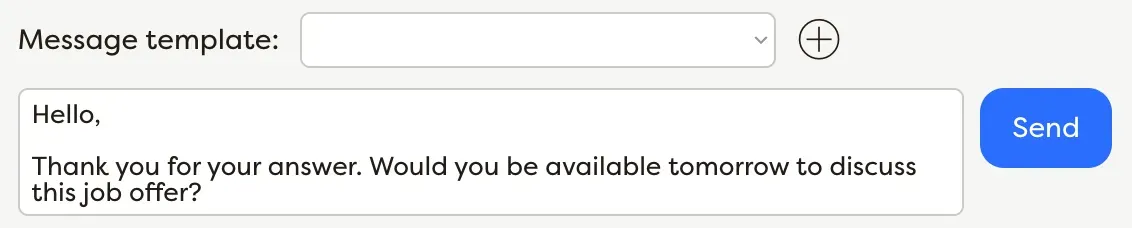
It is hard to keep track of all your candidates and their touchpoints. A unified inbox solves that problem by bringing your email and WhatsApp conversations into one place, while the candidate record keeps the notes you log about your LinkedIn and InMail exchanges right next to them. You can even add WhatsApp to your outreach sequences to reach candidates on the messaging app they use most.
Never miss a candidate again
When conversations and reminders live in one dashboard, recruiters spend less time hunting for context. Every email thread and every LinkedIn task is linked to the candidate and to the campaign it belongs to.
Keep outreach and follow-ups on schedule for better engagement
The sequence handles the email follow-ups and their timing. The LinkedIn touchpoints stay organized in the same sequence as tasks, so you can focus on what really matters: the conversations. Use personalization variables like First Name, Company, Industry and Skills in your drafts. Need a human touch at the right time? Add a manual task step to make sure your message gets across.
Personalization at scale
Adapt your approach to each candidate without sacrificing the personal touch. Customize your messages with text variables like First Name, Company, Industry and Skills. Use AI to draft a line that fits each profile, then review it before it goes out.
How to manage LinkedIn connection requests: wrapping up
Managing LinkedIn connection requests inside one workflow turns a routine task into a reliable recruiting process. The key is to use the tool as support for thoughtful outreach, not as a replacement for judgment. The sequence prepares, reminds and follows up by email. You send every connection request yourself.
From the 200-character note to the weekly limit, we have covered the constraints that come with connection requests. A single workspace makes them easier to live with. Within one platform, you can build the list, draft tailored notes, track each task, and measure what works.
The goal is simple: reach out with more consistency, more context, and less manual admin. Make your LinkedIn strategy more effective by organizing your connection requests in one place. If you are also reviewing your sourcing stack, see our comparison of alternatives to LinkedIn Recruiter.
A controlled workflow
Prepare and track follow-ups; the user initiates actions permitted by their account.
Centralize multichannel outreach, prepare follow-ups, and keep control of the actions available in each account.
Answer 3 quick questions and we will recommend the best option for your hiring workflow.
How large is your recruiting team?

Author
Pierre-Alexis ArdonCo-founder
Pierre-Alexis Ardon is co-founder of Leonar, where he focuses on building AI-powered recruiting systems, assisted sourcing, and search optimization. With a background in engineering and over 7 years working at the intersection of artificial intelligence and talent acquisition, he designs the algorithms that power Leonar's candidate matching and workflow assistance. Pierre-Alexis advises recruitment agencies on their digital transformation and regularly publishes analyses on how AI agents are reshaping HR workflows. He is passionate about making advanced technology accessible to recruiters who are not engineers.