The types of applicant tracking systems (and which one fits your desk)
Compare the main types of applicant tracking systems by workflow, fit, and trade-offs, so you can choose the right ATS before shortlisting vendors.


Most guides about applicant tracking systems answer the wrong question. They rank brands. They tell you the twelve best tools, then leave you to work out which kind of tool you actually needed. That order is backwards. The type of ATS you choose shapes what the software will do for years. The brand is a detail inside that choice.
This guide fixes the order. It walks through the real types of applicant tracking systems, sorted by who they fit and where they break. If you are new to the category, our explainer on what an applicant tracking system is covers the basics first. Here we go one level up, to the taxonomy a buyer needs before building a shortlist.
Why the type of ATS matters more than the brand you pick
Each ATS does one core job. It stores your jobs and candidates, then moves people through clear stages. That much is shared. Yet the tools assume very different worlds.
Some assume a large company hiring for itself. Some assume a lean team that wants speed. Some assume an agency that sells to clients. When the tool’s assumption matches your desk, the software feels invisible. When it does not, you fight it every day.
That is why the type decides more than the logo. An enterprise ATS may be a poor fit for a three-person search firm. A focused standalone tool may not cover an agency’s client pipeline. Some gaps can be hard to configure away. So the first question is not “which tool is best.” It is “which kind of tool is built for the way I work.”
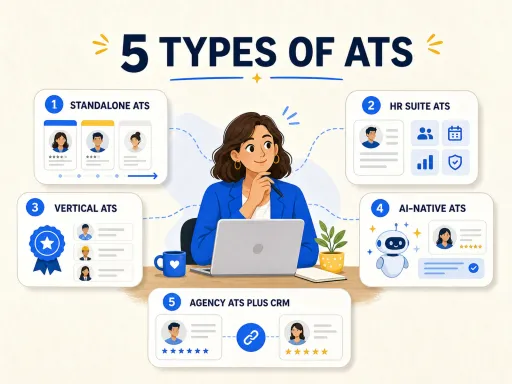
The five types of ATS at a glance
Before the detail, here is the whole taxonomy in one view. Read it by workflow, not by brand. Each type assumes a way of working, and each one fails somewhere.
Standalone ATS: the dedicated recruiting engine
A standalone ATS focuses on the applicant journey, from application to offer. Some products add related tools, but recruiting remains the main job.
This is the type most people picture when they hear “ATS.” Resume parsing can move key details from a PDF into fields you can search. You may also get interview booking, shared notes, and scorecards. The aim is a clear tool that is quick to learn.
Who it fits: an in-house team that hires for its own roles on a regular basis. If people apply to you and your job is to sort, screen, and hire them, a standalone ATS is often all you need.
What to test: scope. A standalone ATS may focus on inbound applications and an in-house hiring team. It may offer little support for sales or client ties. If your work involves selling as well as hiring, test those tasks before you buy. That need is why the agency type exists, which we come back to below.
The ATS inside an HR suite: recruiting as one module of a bigger system
The second type is not always a separate hiring tool. It can be one part of a larger HR suite.
Large firms may use an HR suite for payroll, benefits, reviews, and headcount. Hiring can be one part of that suite. The draw is a shared staff record. Ask each vendor to show how a new hire moves into onboarding and payroll. Do not assume each link removes manual work.
Who it fits: large teams that already use one HR tool and want hiring tied to it. If you want one staff record from hire to exit, the suite may fit.
What to test: setup effort and recruiter speed. A broad suite can ask for more planning than a focused ATS. Test the full hiring flow with your own users and data. A smaller team should also check whether it will use the wider HR features.
Modern cloud ATS versus legacy on-premise systems
Cutting across every type is a second axis: how old the architecture is. This one is easy to miss on a demo, and it matters more than it looks.
Older systems may need local servers, manual updates, or more help from IT. Cloud tools can reduce that work, but age alone does not decide quality. During a demo, test update ownership, mobile access, and links to your key tools. Those checks reveal more than a “modern” label.
We treat this axis in full in our guide to modern ATS versus legacy ATS, so we will not re-argue it here. Just know that “type” is two questions at once: what the tool is built to do, and how modern the engine under it is. A vertical tool on a legacy engine can still frustrate you.
Vertical ATS: built for staffing, healthcare, or executive search
The third type narrows by industry. A vertical ATS is shaped around the rules of one field, and it trades breadth for fit.
Staffing tools may support placement volume and client management. Healthcare tools may include credential checks, licenses, and shift-based roles. Executive search tools may support long, relationship-led searches with a small group of finalists. Each product still needs testing against your own process.
Who it fits: teams with firm, niche needs. If rules, checks, or a rare process shape your day, a broad tool may fight you. A vertical one may feel built for you.
What to test: work outside the tool’s main field. A vertical ATS may be a poor fit if your team spans many sectors. Test your broadest flow as well as your most niche one. This shows whether the close fit may limit future work.
AI-native ATS versus bolt-on AI
A newer split is about how the tool was built, not what it hires for. You will see AI on many feature lists. Ask if it improves a core task or only adds a small helper.
A bolt-on approach adds an AI button to an old workflow. It writes a job description or summarizes a resume, then hands you back to the same manual process. An AI-native tool is built the other way round. Ranking candidates, drafting outreach, and enriching records are part of the core, not a widget in the corner. The gap shows in daily use. One saves you a click. The other changes how the work flows. Our explainer on the AI-native ATS digs into the distinction.
Who it fits: any team that wants the software to carry real load, not just decorate the old way of working. Where it breaks: hype. “AI” on a feature list proves nothing. You have to test whether it does useful work or just looks modern in a demo.
How ATS pricing shapes the category
Price is not just a number. It also shows how a vendor packages the tool. Yet the ATS type alone does not set the cost.
Some vendors publish plans, while others ask you to contact sales. Either model can appear in more than one ATS category. Compare the same team size and needs across current vendor pages. Then ask about setup, support, data moves, and any limits on key features.
Published pricing makes an early comparison easier. A custom quote may cover a more complex package, but you need a full cost breakdown to judge it. We keep Leonar’s current numbers on the pricing page, and you can compare tools in our best ATS for recruitment shortlist.
The agency ATS with CRM built in: why an outbound desk needs both
Here is the section that decides the page. In our work building recruiting software for agencies, we see a common problem. A search firm buys a well-reviewed ATS, then runs its client list in a spreadsheet beside it. Several ATS types can leave that gap because they focus on internal hiring.
A focused ATS may assume that candidates apply and an internal hiring manager owns the role. An agency desk often works another way. Recruiters find people who never applied, while also serving the client who pays. A tool built mainly for inbound hiring may not cover that shape. The agency may need a separate sales tool, which can create duplicate work and split records.
An agency should therefore compare an ATS with a recruitment CRM in the same system. The ATS side runs candidate pipelines. The CRM side runs client relationships and business development. A shared database can connect a candidate, a job order, and a client. This can reduce copying and stale records.
Leonar is one example of this category. It is built as an ATS and a CRM in one platform, with AI-native sourcing across a native database of over 870 million profiles, so an agency can run candidate work and client work without a second tool. It publishes its pricing openly and is designed for recruiters, not power users. For the full agency view, see our guide to the best applicant tracking systems for staffing agencies.
How to choose the right type of ATS for your desk
Start with your workflow, not a feature list. Ask three plain questions, in order.
Only after those answers do you look at brands. The type sets the boundary of what any tool in it can do. The brand just decides how well it does it. Get the type right first, and the shortlist almost writes itself.
Pick the type first, then the tool
The market sells you brands. Your desk needs a type. Sort the tools by the workflow they assume, match that to how you actually work, and the right shortlist follows. If you run an agency, that path almost always ends at an ATS and CRM in one system. See how Leonar works for agencies, compare the numbers on our pricing page, or book a demo to watch it run on your own desk.
Frequently asked questions
What are the main types of applicant tracking systems?
There are five main types. A standalone ATS is a dedicated recruiting tool. An ATS module lives inside a larger HR suite. A vertical ATS is built for one industry, like staffing or healthcare. An AI-native ATS is designed around automation from the start. An agency ATS with a CRM built in serves outbound desks that sell to clients as well as hire. Most tools are a blend, so judge them by the workflow they assume, not the label.
What is the difference between an ATS and a recruitment CRM?
An ATS manages applicants for open roles. A recruitment CRM manages relationships with passive talent and, for agencies, with clients. One tracks today's pipeline, while the other builds future relationships. Agencies often do outbound work and win clients, so they should compare tools that offer both workflows in one system.
What type of ATS is best for a staffing or recruitment agency?
An agency should usually compare platforms that combine an ATS and a CRM. Agencies manage candidate pipelines as well as client work. A combined system can track placements, business development, and candidate relationships in one place. Test it with both sides of your workflow before you choose.
Are all applicant tracking systems the same?
No. They share a core job, storing candidates and moving them through stages, but they assume very different workflows. An enterprise HR suite is built for structured internal hiring. A standalone ATS is built for speed. A vertical tool is built for one industry's rules. Picking the wrong type is more costly than picking the wrong brand, because the type decides what the tool will never do well.
How much do the different types of applicant tracking systems cost?
Pricing varies by vendor, team size, and package. Do not assume the ATS type sets the price. Compare the same needs across current vendor plans, then ask what setup, support, and key features cost. Leonar lists its current plans on its public pricing page.
Answer 3 quick questions and we will recommend the best option for your hiring workflow.
How large is your recruiting team?

Author
Pierre-Alexis ArdonCo-founder
Pierre-Alexis Ardon is co-founder of Leonar, where he focuses on building AI-powered recruiting systems, assisted sourcing, and search optimization. With a background in engineering and over 7 years working at the intersection of artificial intelligence and talent acquisition, he designs the algorithms that power Leonar's candidate matching and workflow assistance. Pierre-Alexis advises recruitment agencies on their digital transformation and regularly publishes analyses on how AI agents are reshaping HR workflows. He is passionate about making advanced technology accessible to recruiters who are not engineers.