What is an applicant tracking system (ATS)?
An applicant tracking system (ATS) is recruiting software that manages hiring from job post to offer. Here is what an ATS does and who uses it.


An applicant tracking system (ATS) is recruiting software that manages hiring in one place. It covers the whole journey, from the day a job goes live to the day you send the offer. Think of it as the home for every job, every candidate, and every step in between. Recruiters use it all day to post roles, collect applications, screen resumes, and move people through clear stages. If your team still tracks candidates across inboxes and spreadsheets, an ATS pulls it all together.
This guide keeps things plain. You will learn what an ATS does, who uses it, how it differs from a recruitment CRM, and when an agency should choose an ATS with CRM built in.
What an applicant tracking system actually does
At its core, an ATS is a database built around two things: jobs and people. Every open role lives in the system. So does every applicant who applies and every candidate you add. The software links the two and tracks the relationship over time.
That sounds simple, and the value is exactly that. No more digging through email threads to recall who applied for which role. You open one screen and see the full picture: who is in the pipeline, what stage they are at, and what comes next. The ATS becomes the single source of truth for your hiring.
It also handles the busywork that used to eat your day. Posting to several boards at once. Reading a resume into clean fields. Booking an interview. Each task is small, but across dozens of roles they pile up fast. The system carries that load for you.
How an ATS works, step by step
The flow follows the natural shape of hiring. Here is the path most teams run through.
- Set up the job. You enter the role, the description, and the requirements. The job gets its own page in the system.
- Post and collect. The ATS pushes the opening to your careers page and job boards. Applications land back in one place, with no manual sorting.
- Parse the resume. When someone applies, the system reads the resume and pulls out the key details: name, contact, skills, experience. This is called resume parsing, and it saves you from retyping anything.
- Screen and rank. The ATS surfaces the candidates who fit the role best, so you review the strongest applications first.
- Move through stages. Each candidate moves along a pipeline you control, from new application to interview to offer. You always know where everyone stands.
- Communicate and schedule. You email candidates, book interviews, and gather team feedback without leaving the platform.
You end up with a hiring process you can see end to end.
The core features every ATS includes
Tools vary, but a few features show up in almost every ATS. These are the basics worth expecting from any product you weigh up:
- Job posting: publish to your careers page and many job boards from one screen.
- Resume parsing: turn a messy resume into structured, searchable data on its own.
- Candidate database: a searchable record of everyone you have sourced or screened.
- Pipeline and stages: custom steps that match how your team actually hires.
- Communication and scheduling: templated emails and interview booking in one tab.
- Reporting: simple dashboards on time-to-hire, source quality, and pipeline health.
Newer systems add automated screening, keyword search, and AI features that draft messages or rank candidates. The basics above are the foundation that everything else builds on. If you are comparing vendors, start with the practical list of best ATS CRM platforms for recruiting agencies rather than a generic HR software grid.
Who uses an applicant tracking system
Recruiters are the heaviest users. They live in the ATS all day, posting roles, reviewing applicants, and nudging candidates forward.
Hiring managers use it more lightly. They log in to review shortlists, leave feedback, and check where a role stands. Talent acquisition leads use the reporting side to spot bottlenecks and plan ahead.
One group the big enterprise guides often skip is recruiting and staffing agencies. Their use looks different. An agency juggles many clients and roles at once, and the candidate is closer to the product they sell. For them an ATS doubles as a client-facing tool and a talent database. See how staffing agencies use an ATS in practice, then map the wider recruiting agency tech stack around it.
ATS vs recruitment CRM: what is the difference?
People mix these up all the time, so here is the clean version. An ATS manages active applicants to fill the roles you have open now. A recruitment CRM manages relationships with passive talent you want to stay close to for later.
Put another way, the ATS is about today’s pipeline. The CRM is about tomorrow’s. An ATS tracks someone who applied to your developer role this week. A recruitment CRM keeps you warm with a great candidate who is not looking yet, but might be in six months.
The two are not rivals. The strongest setups use both. Applicants flow through a structured hiring process, while every other promising person stays in a nurtured pipeline. For the full breakdown, our guide on the difference between an ATS and a recruitment CRM covers when you need each. And once you are comparing vendors, our list of candidate relationship management tools built for recruiters compares the CRM side by workflow, nurture automation, and cost.
Do you actually need an ATS?
If you hire a few people a year, a shared spreadsheet might still hold. Once hiring becomes regular, though, the spreadsheet starts to leak. Candidates fall through the cracks. Two people email the same applicant. Nobody can say where a role stands.
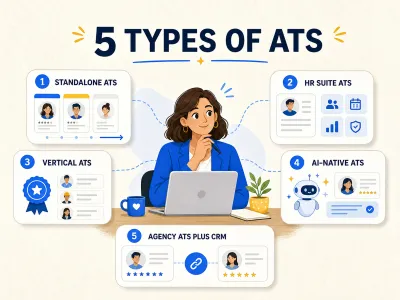
A good rule: if you run several roles at once, hire across more than one team, or recruit for clients, you have outgrown manual tracking. That is when the best ATS for recruiting pays for itself in hours saved. Tools like Leonar pair that hiring workflow with sourcing and outreach, so the database does more than store names. For most teams that hire regularly, the question is less whether you need one and more which one fits how you work. To see the market sorted by who each kind suits, read our guide to the types of applicant tracking systems. Cost is a big part of that fit: if a large enterprise ATS is on your shortlist, our breakdown of Greenhouse ATS pricing compares its Core, Plus, and Pro packages, quote-only model, and buyer-reported overall annual contract ranges. If your current system feels slow or fragmented, our guide to modern ATS versus legacy ATS explains what to look for before switching.
Ready to see what an organized hiring process feels like? Take a look at how a modern ATS keeps recruiting agencies on top of every role.
Frequently asked questions
What does ATS stand for?
ATS stands for applicant tracking system. It is software that helps you manage recruiting and hiring in one place. The system stores your jobs and candidates, tracks applications through clear stages, and handles routine tasks like posting roles and booking interviews.
How does an ATS read a resume?
It uses a feature called resume parsing. When a candidate applies, the system scans the document and pulls out key details, such as name, contact, skills, and work history. It drops those into fields you can search. So you never retype a resume, and you can find people by skill fast.
Is an ATS the same as a CRM?
No, though they work well together. An ATS manages active applicants to fill roles you have open now. A recruitment CRM nurtures relationships with passive talent for the future. One is about today's pipeline, the other about tomorrow's.
Do small companies and agencies use an ATS?
Yes, and more of them every year. Small companies adopt an ATS once hiring becomes regular enough that spreadsheets start to fail. Recruiting and staffing agencies rely on one even more. They juggle many clients and roles, and need a shared, client-ready view of every candidate.
Answer 3 quick questions and we will recommend the best option for your hiring workflow.
How large is your recruiting team?

Author
Pierre-Alexis ArdonCo-founder
Pierre-Alexis Ardon is co-founder of Leonar, where he focuses on building AI-powered recruiting systems, assisted sourcing, and search optimization. With a background in engineering and over 7 years working at the intersection of artificial intelligence and talent acquisition, he designs the algorithms that power Leonar's candidate matching and workflow assistance. Pierre-Alexis advises recruitment agencies on their digital transformation and regularly publishes analyses on how AI agents are reshaping HR workflows. He is passionate about making advanced technology accessible to recruiters who are not engineers.