What Is a Recruitment CRM? Definition and Benefits
A recruitment CRM is software that nurtures candidate relationships before they apply. See what it does, how it differs from an ATS, and when you need one.


A recruitment CRM is software that helps recruiters build and keep relationships with candidates, not just track the people who already applied. CRM stands for candidate relationship management, and the tool exists to keep passive talent warm until the right role opens.
That layer turns a pile of resumes into a talent pool you can reuse. The idea comes from classic CRM tools, which teams have long used to manage client relationships rather than candidate ones. Here, it gives recruiters a faster way to source profiles, run the candidate pipeline, and work as a team.
In this article, I will explain what a recruitment CRM is, how it works, how it differs from an ATS, and when your team actually needs one. If you already know the basics and want to compare specific tools, head straight to our 13 best recruitment CRM software comparison.
What is a recruitment CRM system?
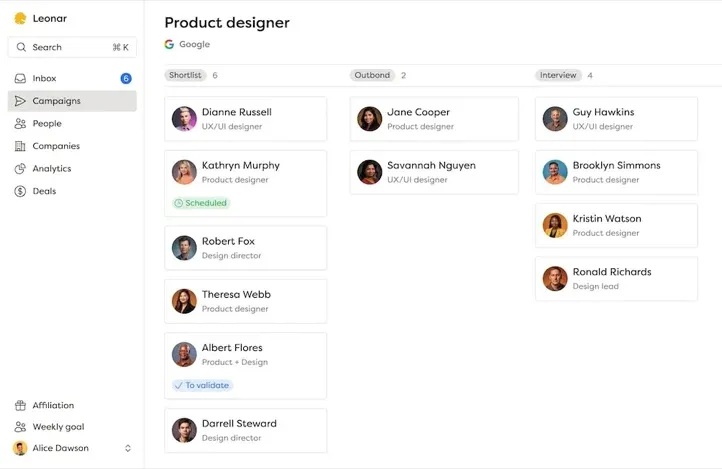
A recruitment CRM is software that helps recruiters run the candidate pipeline. It gives you one place to source and store candidate data, automate outreach, nurture talent pools, and work with your team.
The tool improves hiring in a simple way. It keeps recruiters on track and focused on the best candidates for each open role, while giving those candidates a better experience.
The word “candidate” is doing a lot of work here. A recruitment CRM is not only about people who applied to your last job post. It is built around everyone you might want to hire. That includes passive people who are happy in their current role today but could be your best placement next quarter.
Recruitment CRM, recruiting CRM, talent CRM: the terminology explained
The words around this category get used loosely, and that confusion is one reason the same question shows up under so many different phrasings. Here is how the terms relate, in plain language.
“Recruitment CRM” and “recruiting CRM” mean the same thing. They are two ways of naming one product category, and you can treat them as interchangeable. Some vendors prefer one, some prefer the other, but the software behind both is identical.
“Candidate relationship management” is what the CRM acronym actually stands for in this context. It describes the discipline: the practice of building and maintaining relationships with candidates over time. The software is the tool; candidate relationship management is the work the tool supports.
“Talent CRM” is the same category again, usually favored by larger in-house talent acquisition teams. It leans on the idea of a long-term talent pipeline, where you nurture segments of professionals for roles that do not exist yet. If a tool calls itself a talent CRM, expect a strong focus on talent pools and future hiring.
One term you should not confuse with any of these is a client CRM. A sales or client CRM manages relationships with the companies that pay you, tracking deals and revenue. A candidate CRM manages relationships with the people you hire. Agencies often need both, which is why we wrote a full guide on the difference between a candidate CRM and a client CRM.
Why should you use a CRM for recruiting?
Recruitment can be a time-consuming and challenging process, but a CRM can ease some of the common pains you face. Here is why you should consider getting one for your team or yourself.
The problems you can solve with a CRM
Recruiters face numerous challenges throughout the talent acquisition process. A recruiting CRM can help solve some of these pain points, including:
- Identifying the most qualified candidates quickly
- Managing a large volume of candidates and their data
- Keeping track of candidate communication and follow-up tasks across multiple channels
- Collaborating with team members and hiring managers
- Maintaining a consistent and positive candidate experience
- Staying organized throughout the recruitment process
- Analyzing performance metrics to improve the hiring process
What you can accomplish with it
A recruiting CRM can help you accomplish several tasks, including:
- Candidate sourcing: find candidates from multiple channels and manage them in one place. A strong CRM paired with a dedicated candidate sourcing software can dramatically expand your reach
- Outreach: personalize and centralize communication with candidates across channels to improve your response rate and interview more top talent
- Automation: increase efficiency by automating repetitive tasks and eliminating manual data entry
- Candidate pipeline view: easily view and manage candidate data in a centralized platform, including resumes, notes, and communication history
- Team collaboration: share candidate data and coordinate hiring decisions among team members, hiring managers, and other stakeholders
- Performance analytics: make data-driven decisions by tracking key metrics, such as time-to-hire, source of hire, and candidate quality. Learn more about strategic sourcing KPIs to measure your recruiting effectiveness
The relationship between ATS and CRM
ATS vs. CRM: the differences and similarities
Recruiters often confuse Applicant Tracking Systems (ATS) with Candidate Relationship Management (CRM) software. Both tools are designed to help manage the candidate pipeline, but there are key differences between them.
An ATS is built to manage the hiring process, from posting a job to onboarding a new hire. These systems lean toward admin, compliance and record-keeping, such as storing applicant data or booking interviews.
But an ATS often lacks the features that level up an outbound recruiting strategy, such as:
- An integration with your LinkedIn Recruiter license to use InMails
- Outbound recruiting management, including automated outreach messages across multiple channels
A CRM, on the other hand, helps recruiters build the relationship with current and future candidates. It is one place to store candidate data, track every touch, and automate outreach. CRM tools put candidate experience first, with email nurture and automated outreach that an ATS usually cannot match.
That said, ATS and CRM systems also share some similarities:
- Both are software solutions that help manage recruitment processes
- Both are used to source candidates, store their data, and manage the hiring pipeline
- Both provide reporting and analytics features to help evaluate recruiting performance
ATS and CRM: you can run both
Many recruitment CRM platforms integrate with an ATS, so recruiters can combine the best of both worlds.
By integrating the ATS, recruiters can:
- Import candidate data from job boards and other sources directly into the CRM platform
- Schedule interviews and manage the hiring process alongside the CRM
- Automate communication with candidates and team members
- Reduce manual data entry to save time and minimize errors
- Analyze performance metrics to make data-driven decisions
- Keep a comprehensive view of the entire hiring process thanks to data synchronization
All in all, ATS and CRM integration gives recruiters a unified way to manage the candidate pipeline and the hiring process together. Recruiters stay organized and focused on finding the best talent while providing a positive candidate experience.
For a deeper look at which tool fits your needs, see our dedicated comparison: ATS or CRM, which is the best software for recruitment. If you want to weigh both in one system, our guide to integrated ATS and CRM platforms for recruiting agencies is the next stop. And if you are still shopping for the tracking side, read our roundup of the best ATS for recruitment.
When an ATS alone is enough, and when the CRM layer pays off
The honest answer to “do I need a recruiting CRM” is: it depends on where your placements come from. The best way to decide is to look at your own desk, not a feature list.
An ATS on its own is often enough when most of your hires come from people who apply to your jobs. If you post a role, receive a healthy flow of applicants, and fill the seat within a few weeks, the tracking workflow is doing the heavy lifting. Your candidates are already raising their hands. You mainly need to move them through stages, keep the record clean, and stay compliant.
The CRM layer starts paying off the moment your best candidates stop applying. If you source passive professionals who are not on the job market, the relationship becomes the work. You reach out, they are not ready, and you need to remember to follow up in three months without losing the thread. That is a job an ATS was never built for.
The same is true for long nurture cycles and repeat hiring. Agencies that place the same kind of role again and again build value by re-engaging people they already know. A recruiter who sourced a great engineer last spring should be able to find that conversation instantly this spring, not start from zero. The CRM keeps that history alive across every candidate you have ever spoken to.
Agency business development pushes the case further. When you sell a search, you promise access to talent that competitors cannot reach quickly. A warm talent pool, segmented and ready, makes that promise real. Without a relationship layer, every new mandate starts cold. With one, it starts with a shortlist.
So the short test is this. If your candidates come to you and your cycles are short, an ATS may cover it. If your candidates rarely apply, if you nurture over months, or if you keep losing track of people you sourced, the CRM layer will earn its place next to the ATS you already run.
What a recruiting CRM does not do
Most guides sell the upside and skip the limits. A clear view of what the tool will not do is what saves you from buying the wrong thing.
A recruiting CRM will not source candidates for you on its own. It widens your reach and sorts what you find. But the call on who to contact, and what to say, is still yours. The best software makes a good recruiter faster. It does not replace the recruiter.
It will not fix bad data or a neglected talent pool. If your records are full of outdated emails and half-finished notes, a CRM will simply organize the mess more neatly. Clean data in, useful pipeline out. That is why teams often pair a new CRM with a candidate database reactivation sprint to get the pool back into shape.
It will not guarantee replies. Automated outreach only performs when the message is relevant and the timing is right. A CRM helps you personalize at scale and follow up consistently, but weak messaging sent faster is still weak messaging.
Finally, a candidate CRM is not a client or sales CRM. It manages relationships with the people you hire, not the companies that pay you. Some agency platforms combine both, but a standalone recruiting CRM will not track your deals, invoices, or revenue. If you need that side too, look for an agency-focused platform rather than assuming one tool covers everything.
How to pick the right CRM for your recruiting team
You now know what a recruitment CRM does and why it matters. The next step is finding the right tool for your team. The market offers dozens of options, from cheap plans to enterprise suites. The right pick depends on your team size, your hiring volume, and whether you need agency features like client management and invoicing.
We put together a detailed comparison of the 13 best recruitment CRM software with pricing, pros, cons, and recommendations by team type. That guide is the place to build your shortlist once you know what you need. If Recruit CRM is already on your list, our guide to the best Recruit CRM alternatives for agencies compares it with other options.
When a recruiting CRM becomes essential
A spreadsheet can work when you hire occasionally. It breaks down when you manage several roles, long nurture cycles, or a large passive talent pool. At that point, recruiters need a shared history of every candidate conversation, not another static list. It also lets you run a candidate database reactivation sprint when that pool goes quiet, instead of losing the placements hiding in old records.
A CRM becomes especially useful for outbound recruiting, agency business development, and roles where the best candidates are not actively applying. If your team already uses an ATS, the goal is not to replace it. The goal is to add a relationship layer that keeps sourced candidates warm until the timing is right.
Recruitment CRM: frequently asked questions
What is a recruitment CRM in simple terms?
A recruitment CRM is software that helps recruiters build and keep relationships with candidates over time, not just track people who already applied. CRM stands for candidate relationship management. It stores candidate data in one place, records every conversation, automates outreach across channels, and keeps passive talent warm until the right role opens. Think of it as the relationship layer that sits alongside your hiring process, focused on people you want to hire later, not only the ones in front of you today.
What is the difference between a recruitment CRM and an ATS?
An ATS manages the hiring process for people who have already applied, from job posting to offer, and handles compliance and application tracking. A recruitment CRM manages relationships with candidates before they apply, including passive talent you source and nurture over months. In short, the ATS is built around the vacancy, while the CRM is built around the person. Many teams run both, because they answer different questions: an ATS asks who is in this pipeline now, and a CRM asks who might I hire next.
Do I need a recruiting CRM if I already have an ATS?
Not always. If most of your placements come from people who apply to your jobs, and your hiring cycles are short, an ATS on its own may be enough. The CRM layer starts paying off when you source passive candidates, run long nurture cycles, re-engage past applicants, or do agency business development. If your best candidates rarely apply and you keep losing track of people you sourced months ago, that is the signal a recruiting CRM will earn its place next to your ATS.
Improve your hiring with Leonar’s recruiting CRM
Leonar adds the relationship layer this article describes, so sourced candidates stay warm and every follow-up lives in one sequence. You can see who to contact next and move through outreach faster, instead of rebuilding context from scattered notes.
See how Leonar’s recruiting CRM works and benefit from its key features, including:
- Candidate import through the Chrome extension or a CSV file, alongside the LinkedIn Recruiter workflow your team already runs
- Smart filters and custom fields to find the best-fit profiles fast
- Centralized contact database that keeps candidate and client history on one record
- Multichannel outreach across email, LinkedIn, and WhatsApp sequences
- Unified inbox for email and WhatsApp replies
- Talent pools and tags to nurture candidates over time
- ATS pipeline and CRM in one platform, with no separate add-on
For recruiting and staffing agencies looking for an all-in-one solution, consider integrated ATS CRM platforms designed for recruitment agencies that handle both candidate relationship management and applicant tracking in one system. If you want to see what a combined ATS and CRM in one platform looks like in practice, explore the platform built for recruiting agencies, or check the pricing to see which plan fits your team.
Frequently asked questions
What is a recruitment CRM in simple terms?
A recruitment CRM is software that helps recruiters build and keep relationships with candidates over time, not just track people who already applied. CRM stands for candidate relationship management. It stores candidate data in one place, records every conversation, automates outreach across channels, and keeps passive talent warm until the right role opens. Think of it as the relationship layer that sits alongside your hiring process, focused on people you want to hire later, not only the ones in front of you today.
What is the difference between a recruitment CRM and an ATS?
An ATS manages the hiring process for people who have already applied, from job posting to offer, and handles compliance and application tracking. A recruitment CRM manages relationships with candidates before they apply, including passive talent you source and nurture over months. In short, the ATS is built around the vacancy, while the CRM is built around the person. Many teams run both, because they answer different questions: an ATS asks who is in this pipeline now, and a CRM asks who might I hire next.
Do I need a recruiting CRM if I already have an ATS?
Not always. If most of your placements come from people who apply to your jobs, and your hiring cycles are short, an ATS on its own may be enough. The CRM layer starts paying off when you source passive candidates, run long nurture cycles, re-engage past applicants, or do agency business development. If your best candidates rarely apply and you keep losing track of people you sourced months ago, that is the signal a recruiting CRM will earn its place next to your ATS.
Answer 3 quick questions and we will recommend the best option for your hiring workflow.
How large is your recruiting team?

Author
Alia ChennoukhContent Manager
Alia Chennoukh is content manager at Leonar, where she covers recruiting operations, CRM implementation, and practical workflow design for talent teams. With a background in HR tech content and 4 years of experience writing for the recruitment industry, she translates complex workflows into clear, actionable advice. Alia specializes in helping recruiters get more from their tools, whether it is setting up candidate pipelines, preparing email sequences, or choosing the right ATS. She brings a pragmatic approach to every piece she publishes.